Best monitor arm for shallow desks (2026)
Most monitor arm roundups assume a deep 30" desk. Apartment standing desks are often 21"–24" deep — and a clamp arm is what makes a 24" display actually usable on a HUANUO 32" or ErGear 40" top. It pulls the screen forward, frees keyboard depth, and keeps the OEM stand from eating the whole surface.
Pair this with our small apartment desk guide or budget desk picks once you know your wall width.
Quick picks
- Best for shallow desks (21–24"): HUANUO single gas spring — proven on compact tops, 13–32"
- Best budget: Amazon Basics gas spring — ~$25–35 for a 24–27" panel
- Best for standing desks: ErGear single (22 lb) — cable clips + brand match with ErGear frames
- Best dual on 48" desks: HUANUO dual — skip on 32" and most 40" layouts
- Best heavy / large panel: ErGear ultrawide arm (26.5 lb) — 27–32"+ and heavier screens
What to check before you buy
- Desk depth — screen + arm base shouldn’t overhang past the desk edge when centered
- Clamp thickness — budget tops are often ~0.6"–1"; verify the listing’s min/max clamp range
- VESA — 75×75 or 100×100; need an adapter if your monitor is non-VESA
- Monitor weight — stay under the arm rating (use the panel weight without the OEM stand)
- Standing desk cables — leave slack in HDMI/USB so the arm and desk can move together
- Clamp vs grommet — clamp is usually better for renters (no drilling)
1. HUANUO Single Monitor Arm — best overall for shallow desks

This is the arm we already recommend next to compact desks — and it earns the top spot here. Gas-spring height, clamp or grommet base, and a weight band that covers most 24–27" WFH monitors. On a 21" deep HUANUO desk, mounting the display on an arm is the difference between “usable” and “keyboard falls off the front.”
Key specs: 13–32" screens · 4.4–19.8 lb capacity · VESA 75×75 / 100×100 · C-clamp + grommet · full tilt / swivel / rotate (verify current listing).
Pros:
- Best default for 21–24" deep apartment desks
- Weight range covers typical 24–27" IPS panels after you remove the stand
- Clamp install — renter-friendly, no grommet hole required
Cons / skip if:
- Heavy 32" or ultrawide panels may need the higher-capacity ErGear below
- Gas spring needs tension tuning — expect 5 minutes with the hex key
- Reach is finite — fold the arm back when you need the full desk depth for writing
Best for: HUANUO 32", ErGear 40", and any 24" deep standing desk with one primary monitor.
2. Amazon Basics Gas Spring Single Arm — best budget
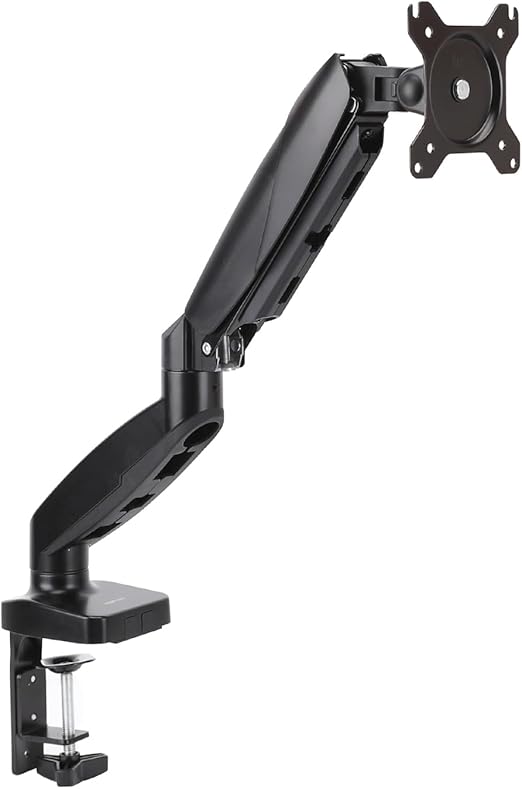
If you only need to get a 24–27" monitor off the desktop and stay under ~$35, this is the “good enough” pick. Gas spring (not a friction knob arm), VESA 75/100, and a clamp range that fits most budget standing-desk tops.
Key specs: 15–27" screens · ~4.4–15.4 lb capacity · VESA 75×75 / 100×100 · extends ~20.5" · clamp for desks ~0.39–4" thick (verify listing).
Pros:
- Lowest price that still feels like a real articulating arm
- Includes cable channel — helpful when the desk lifts
- Easy returns via Amazon if the spring won’t hold your panel
Cons / skip if:
- 15.4 lb ceiling — skip for heavier 27–32" gaming monitors
- Not the pick if you already own a HUANUO or ErGear desk and want brand-matched capacity
- Build is entry-level — fine for WFH, not a forever arm
Best for: First apartment setup with a light 24" monitor and a tight accessory budget.
3. ErGear Single Monitor Arm (22 lb) — best for standing desks

If you raise and lower the desk every day, buy an arm with headroom on weight rating and decent cable clips. This ErGear single holds up to 22 lb on screens up to ~36" — more margin than the cheapest arms when you type hard at standing height. Natural pair with our ErGear desk pick.
Key specs: 13–36" screens · up to 22 lb · VESA 75×75 / 100×100 · ~15.3" extension / ~17.5" height adjust · C-clamp + grommet · cable clips.
Pros:
- Higher weight rating than Amazon Basics — less sag risk on 27" panels
- Cable clips help when the whole desk moves through sit-stand range
- Same brand ecosystem as popular ErGear frames — easy mental pairing
Cons / skip if:
- Overkill (and usually pricier) for a light 22–24" office panel
- Still not dual-monitor — one arm, one screen
- Confirm underside clearance; some frames have crossbars that block thick clamps
Best for: Daily sit-stand users on 40–48" ErGear / Claiks desks with a 24–27" primary display.
4. HUANUO Dual Monitor Arm — best dual (48" desks only)

Dual arms on a compact desk are a trap if your top is 32" or 40" wide. On a 48" desk with ~56–60" of wall clearance, a gas-spring dual can work — two 24" panels, or one monitor + laptop off to the side. On narrower desks, prefer one arm + laptop or a single ultrawide instead.
Key specs: Two arms for 13–32" · ~4.4–19.8 lb per arm · VESA 75×75 / 100×100 · C-clamp + grommet · independent tilt / swivel / rotate per screen.
Pros:
- Independent height per screen — better than a fixed dual pole for mixed monitor sizes
- Frees the full 48×24 surface for keyboard, notebook, and writing
- Same brand family as our shallow-desk single pick
Cons / skip if:
- Skip on 32" and most 40" desks — width and clamp space disappear fast
- Two heavy panels can add noticeable front-edge load on budget frames
- Cable slack doubles — plan a tray or under-desk clips before you mount
Best for: Claiks / ErGear 48" desks where dual 24" screens are non-negotiable.
5. ErGear Ultrawide / Heavy Single Arm (26.5 lb) — best for larger panels

Bought a 27–32" or light ultrawide for a 48" standing desk? Step up the weight rating. This ErGear heavy single is rated to 26.5 lb and lists support into the ultrawide range — use it when the HUANUO 19.8 lb single feels underspec’d on paper.
Key specs: 17–49" class listing · up to 26.5 lb · VESA 75×75 / 100×100 · full motion tilt / swivel / rotate · desk clamp mount (verify thickness range on listing).
Pros:
- Headroom for heavier 27–32" panels common on Claiks / ErGear 48" setups
- One ultrawide often beats dual arms on a shallow 24" deep top
- Higher rating reduces the “slow droop” problem cheap arms get under load
Cons / skip if:
- Overkill for a light 24" office monitor — buy the HUANUO or Amazon Basics instead
- Large panels still need eye-distance; a 21" deep desk may feel close even on an arm
- Confirm VESA pattern — some ultrawides need an adapter plate
Best for: 48" compact desks running one larger primary display instead of dual monitors.
Shallow desk depth guide
- 21" depth (32" HUANUO): Monitor arm strongly recommended; keyboard depth is tight without one
- 24" depth (40" / 48" desks): Arm optional for one display + laptop; still helps dual layouts
- Standing range: Leave slack in video and USB cables so nothing yanks when you lift
Measure wall clearance the same way as in our small apartment guide — add 4–6" for the clamp and cable bend.
Skip the arm if…
- Your display is small (≤22") and you mostly use a laptop
- The desk is 32" wide with no spare edge for a clamp + base
- The top is glass or very thin — many clamps are not safe
- You’re already wall-mounting the monitor (renter rules permitting)
Complete your setup
Last updated: July 2026. Verify clamp specs, weight limits, and current prices before purchasing.